
The New Creator Channel Experience
As of November 13, 2025, DRiP introduced an updated Creator Channel experience designed to make it easier for fans to follow your work and support what you’re building.
Your Creator Channel is your public-facing page — this is what collectors see when they visit you on DRiP.
🏠 Your Channel Layout
Top of the Page: How fans interact with you
At the top of your channel, fans can:
Follow you
Message you directly
Turn notifications on or off
Visit your connected social links
This is where people decide how they want to stay connected to you.
⬅️ Left Side: Your content
The left side of your channel focuses on what you publish.
Tabs include:
Home – your main feed (posts and updates)
Collectibles – everything you’ve released
Store – items available for direct purchase
Auctions – live and past auctions
Leaderboard – your channel’s activity highlights
Your Home tab is where Posts live, creating a clean, scrollable feed that shows what you’re working on and sharing.
➡️ Right Side: Support & context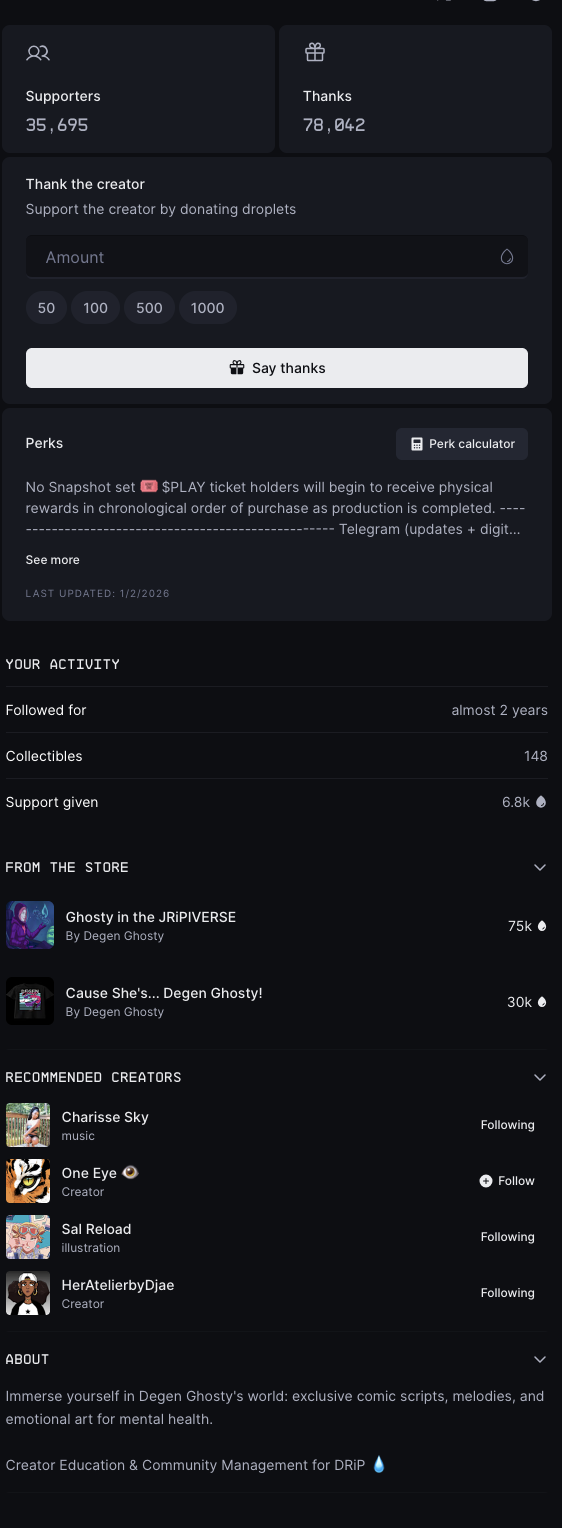
The right side gives fans context about your channel and ways to support you.
Here you’ll find:
Supporters & Thanks – who’s actively supporting you
Send Thanks – a way for fans to donate droplets
Perks – rewards tied to support or snapshots
Your Activity – follower duration and support history
From the Store – featured items from your storefront
Recommended Creators – creators your audience may also enjoy
About – your channel description and mission
👥 Supporters (Updated Metric)
Your channel now displays Supporters instead of total followers.
A Supporter is someone who:
Follows you
AND has spent at least 10 droplets on your channel
This highlights meaningful engagement rather than passive follows.
Your full follower count is still available inside Creator Studio.
🔒 Locked Posts & Advanced Features
Locked Posts, perks, snapshots, and publishing tools are managed inside Creator Studio, not directly on your channel page.
Creator Studio is where creation happens — your channel is where fans experience it.
(Creator Studio features are covered in a separate articles.)
Comments
0 comments
Article is closed for comments.